Deprecated: optional(): Implicitly marking parameter $callback as nullable is deprecated, the explicit nullable type must be used instead in /www/wwwroot/redcat.newcitystaging.com/vendor/illuminate/support/helpers.php on line 190

Deprecated: with(): Implicitly marking parameter $callback as nullable is deprecated, the explicit nullable type must be used instead in /www/wwwroot/redcat.newcitystaging.com/vendor/illuminate/support/helpers.php on line 430

Deprecated: Jenssegers\Blade\Blade::__construct(): Implicitly marking parameter $container as nullable is deprecated, the explicit nullable type must be used instead in /www/wwwroot/redcat.newcitystaging.com/vendor/jenssegers/blade/src/Blade.php on line 34

Deprecated: Illuminate\Container\Container::beforeResolving(): Implicitly marking parameter $callback as nullable is deprecated, the explicit nullable type must be used instead in /www/wwwroot/redcat.newcitystaging.com/vendor/illuminate/container/Container.php on line 1151

Deprecated: Illuminate\Container\Container::resolving(): Implicitly marking parameter $callback as nullable is deprecated, the explicit nullable type must be used instead in /www/wwwroot/redcat.newcitystaging.com/vendor/illuminate/container/Container.php on line 1171

Deprecated: Illuminate\Container\Container::afterResolving(): Implicitly marking parameter $callback as nullable is deprecated, the explicit nullable type must be used instead in /www/wwwroot/redcat.newcitystaging.com/vendor/illuminate/container/Container.php on line 1191

Deprecated: Illuminate\Container\Container::setInstance(): Implicitly marking parameter $container as nullable is deprecated, the explicit nullable type must be used instead in /www/wwwroot/redcat.newcitystaging.com/vendor/illuminate/container/Container.php on line 1430

Deprecated: Illuminate\Contracts\Container\Container::beforeResolving(): Implicitly marking parameter $callback as nullable is deprecated, the explicit nullable type must be used instead in /www/wwwroot/redcat.newcitystaging.com/vendor/illuminate/contracts/Container/Container.php on line 200

Deprecated: Illuminate\Contracts\Container\Container::resolving(): Implicitly marking parameter $callback as nullable is deprecated, the explicit nullable type must be used instead in /www/wwwroot/redcat.newcitystaging.com/vendor/illuminate/contracts/Container/Container.php on line 209

Deprecated: Illuminate\Contracts\Container\Container::afterResolving(): Implicitly marking parameter $callback as nullable is deprecated, the explicit nullable type must be used instead in /www/wwwroot/redcat.newcitystaging.com/vendor/illuminate/contracts/Container/Container.php on line 218

Deprecated: Illuminate\View\FileViewFinder::__construct(): Implicitly marking parameter $extensions as nullable is deprecated, the explicit nullable type must be used instead in /www/wwwroot/redcat.newcitystaging.com/vendor/illuminate/view/FileViewFinder.php on line 53

Deprecated: Illuminate\Support\Traits\Conditionable::when(): Implicitly marking parameter $callback as nullable is deprecated, the explicit nullable type must be used instead in /www/wwwroot/redcat.newcitystaging.com/vendor/illuminate/conditionable/Traits/Conditionable.php on line 21

Deprecated: Illuminate\Support\Traits\Conditionable::when(): Implicitly marking parameter $default as nullable is deprecated, the explicit nullable type must be used instead in /www/wwwroot/redcat.newcitystaging.com/vendor/illuminate/conditionable/Traits/Conditionable.php on line 21

Deprecated: Illuminate\Support\Traits\Conditionable::unless(): Implicitly marking parameter $callback as nullable is deprecated, the explicit nullable type must be used instead in /www/wwwroot/redcat.newcitystaging.com/vendor/illuminate/conditionable/Traits/Conditionable.php on line 53

Deprecated: Illuminate\Support\Traits\Conditionable::unless(): Implicitly marking parameter $default as nullable is deprecated, the explicit nullable type must be used instead in /www/wwwroot/redcat.newcitystaging.com/vendor/illuminate/conditionable/Traits/Conditionable.php on line 53

Deprecated: Illuminate\Support\Arr::first(): Implicitly marking parameter $callback as nullable is deprecated, the explicit nullable type must be used instead in /www/wwwroot/redcat.newcitystaging.com/vendor/illuminate/collections/Arr.php on line 188

Deprecated: Illuminate\Support\Arr::last(): Implicitly marking parameter $callback as nullable is deprecated, the explicit nullable type must be used instead in /www/wwwroot/redcat.newcitystaging.com/vendor/illuminate/collections/Arr.php on line 219

Deprecated: Illuminate\Events\Dispatcher::__construct(): Implicitly marking parameter $container as nullable is deprecated, the explicit nullable type must be used instead in /www/wwwroot/redcat.newcitystaging.com/vendor/illuminate/events/Dispatcher.php on line 75

Deprecated: Illuminate\View\Compilers\BladeCompiler::anonymousComponentPath(): Implicitly marking parameter $prefix as nullable is deprecated, the explicit nullable type must be used instead in /www/wwwroot/redcat.newcitystaging.com/vendor/illuminate/view/Compilers/BladeCompiler.php on line 811

Deprecated: Illuminate\View\Compilers\BladeCompiler::anonymousComponentNamespace(): Implicitly marking parameter $prefix as nullable is deprecated, the explicit nullable type must be used instead in /www/wwwroot/redcat.newcitystaging.com/vendor/illuminate/view/Compilers/BladeCompiler.php on line 833

Deprecated: Illuminate\View\View::render(): Implicitly marking parameter $callback as nullable is deprecated, the explicit nullable type must be used instead in /www/wwwroot/redcat.newcitystaging.com/vendor/illuminate/view/View.php on line 156

Deprecated: Illuminate\View\Engines\CompilerEngine::__construct(): Implicitly marking parameter $files as nullable is deprecated, the explicit nullable type must be used instead in /www/wwwroot/redcat.newcitystaging.com/vendor/illuminate/view/Engines/CompilerEngine.php on line 42

Deprecated: Illuminate\Support\Str::createRandomStringsUsing(): Implicitly marking parameter $factory as nullable is deprecated, the explicit nullable type must be used instead in /www/wwwroot/redcat.newcitystaging.com/vendor/illuminate/support/Str.php on line 962

Deprecated: Illuminate\Support\Str::createUuidsUsing(): Implicitly marking parameter $factory as nullable is deprecated, the explicit nullable type must be used instead in /www/wwwroot/redcat.newcitystaging.com/vendor/illuminate/support/Str.php on line 1667

Deprecated: Illuminate\Support\Str::freezeUuids(): Implicitly marking parameter $callback as nullable is deprecated, the explicit nullable type must be used instead in /www/wwwroot/redcat.newcitystaging.com/vendor/illuminate/support/Str.php on line 1712

Deprecated: Illuminate\Support\Str::createUlidsUsing(): Implicitly marking parameter $factory as nullable is deprecated, the explicit nullable type must be used instead in /www/wwwroot/redcat.newcitystaging.com/vendor/illuminate/support/Str.php on line 1774

Deprecated: Illuminate\Support\Str::freezeUlids(): Implicitly marking parameter $callback as nullable is deprecated, the explicit nullable type must be used instead in /www/wwwroot/redcat.newcitystaging.com/vendor/illuminate/support/Str.php on line 1819
Dellモニター明るさ調整の決定版!ボタン無反応や暗い画面を一発解決

Dellモニター明るさ調整の決定版!ボタン無反応や暗い画面を一発解決

目次
Dellモニター明るさ調整の決定版!ボタン無反応や暗い画面を一発解決
@ creator • Click to Play Video Inline
🎵 Dellモニター明るさ調整の決定版!ボタン無反応や暗い画面を一発解決

オフィスからテレワーク、高精細なクリエイティブ現場に至るまで、圧倒的な国内シェアを誇るDell(デル)製ディスプレイ。しかし、日々の業務やゲームプレイ中に「画面が眩しすぎて目を痛める」「文字が暗くて読みにくいのに、ボタンを押しても輝度スライダーが動かない」といったトラブルに直面するユーザーが後を絶ちません。物理ボタンを連打しても反応しない現象や、メニュー内の特定項目が選べない状態には、ハードウェアとOSが絡み合う明確な技術的要因が存在します。

毎日の作業効率や眼精疲労に直結する画面の明るさは、モニター背面のボタンを手探りで押し続けるストレスから解放され、PC上から手元でスマートにコントロールするのが2026年の標準的なアプローチです。本体OSD(オンスクリーンディスプレイ)がロックされる構造的な仕組みから、Windows11およびMac環境で一瞬にして理想の明るさを実現する実践手順までを網羅して解説します。

📌 【この記事の重要ポイントまとめ】
  • 要点1:明るさ調整がグレーアウトする主因は「Windows/MacのHDR有効化」や「特定プリセットモード(sRGB/Smart HDR等)」による輝度制御の自動固定である。
  • 要点2:公式ユーティリティ「Dell Display Manager(DDM)」を導入すれば、物理ボタンに一切触れずキーボードショートカットやマウス操作で手元から一発調整が可能になる。
  • 要点3:ボタン無反応は故障ではなく「OSDメニューロック(特定ボタンの10秒長押し等)」が作動しているケースが極めて多く、正しい解除手順で即座に復旧できる。

なぜ動かない?Dellモニターの明るさ変更がグレーアウトする決定的理由

Dellモニターのメニュー操作時に「輝度/コントラスト」のバーが暗く沈んで選択できない現象は、決して初期不良や基板の故障ではありません。ディスプレイが受信している映像信号の種類や、現在適用されているカラーマネジメントの仕様によって、内部ファームウェアが意図的にハードウェア制御を制限している状態です。

最も遭遇頻度が高い原因がHDR(ハイダイナミックレンジ)機能の有効化です。Windows 11の「設定 > システム > ディスプレイ」やmacOSのディスプレイ設定においてHDRがオンになっている場合、輝度の決定権はOSとコンテンツ側のメタデータに委ねられます。Dellのディスプレイ内部では最大輝度とローカルディミングが自動最適化されるため、ユーザーがOSDメニューから手動で輝度数値を固定する機能が強制的にロックされる仕様となっています。

また、モニター側のDellモニター プリセットモード 変更で「Smart HDR」や「sRGB」「色温度固定モード」を選択している場合も同様です。色再現性の国際規格に厳格に準拠させるプロファイルでは、規定された標準白色点(D65など)と輝度バランスを崩さないよう、コントラストや明るさの個別変更がグレーアウトするようにプログラミングされています。手動調整を取り戻すには、OS側のHDRをオフにするか、OSDメニューの「カラー」項目からプリセットを「標準」または「ユーザーカラー」へと切り替える必要があります。

当時のメディア報道・掲載写真
【検証資料 1】当時のメディア報道・掲載写真(出典:i.dell.com)

本体ボタンに触れず一発!Dell Display Managerとキーボード操作の威力

モニター背面のジョイスティックや底面の小型ボタンに手を伸ばし、階層の深いメニューを行き来する作業は、作業の集中力を削ぐ大きな要因です。Dellユーザーであれば絶対に導入しておくべき公式ソフトウェアがDell Display Manager(DDM / DDM 2.x)です。

DDMをインストールすると、ディスプレイ通信規格「DDC/CI」を経由してPCからモニター内部の制御チップへ直接コマンドが送られます。タスクバー常駐アイコンのクリックやマウスホイールの回転だけで、複数台接続されたマルチモニターであっても個別または連動して瞬時に輝度を変更可能です。さらにDell ディスプレイ 輝度 調整 ショートカットを設定すれば、例えば「Ctrl + Alt + ↑/↓」にお好みのキーバインドを割り当てるだけで、キーボードから手を離さずに1%刻みで調光が完了します。

アプリケーションごとの「自動モード」連携も実用性を劇的に高めます。テキスト作業が中心のExcelやWord、VS Codeを開いた際は輝度30%の「ComfortView(ブルーライト軽減)」へ自動降下させ、ブラウザでYouTubeや動画編集ソフトをアクティブにした瞬間に輝度75%の「動画」プリセットへ自動で引き上げるといったインテリジェントな運用がシームレスに機能します。

【2026年最新】作業環境別・輝度とコントラストの推奨設定データ

適切な輝度設定は、作業効率だけでなくVDT症候群(テクノストレス眼症)の予防において厚生労働省のガイドライン等でも強く推奨されています。周囲の照度(ルクス)とディスプレイの輝度(カンデラ)を適切に同期させることが基本原則です。

作業用途・環境推奨輝度設定(% / 概算cd/㎡)推奨コントラスト・モード編集部の見解・実務効果
一般オフィスワーク / 文書作成
(室内照度 300〜500 lux)
25%〜35%
(約100〜120 cd/㎡)
コントラスト:75%(初期値)
プリセット:ComfortView
白背景の眩しさを抑制。8時間以上の連続デスクワークにおける眼精疲労を大幅に緩和。
WEBデザイン / 写真・画像編集
(色評価用標準環境)
30%〜45%
(約120〜140 cd/㎡)
コントラスト:75%固定
プリセット:Custom Color / sRGB
コントラストを変更すると階調飛びが発生するため初期値を維持。印刷・他デバイスとの色ズレを防止。
動画鑑賞 / HDRゲーミング
(薄暗い室内環境)
70%〜100%
(250〜400+ cd/㎡)
コントラスト:75%〜80%
プリセット:Smart HDR / Game
明暗のダイナミックレンジを最大化。暗所ディテールの視認性と映像への没入感を向上。

注意点として、Dellモニター 輝度 コントラスト 最適設定を追求する際、コントラスト値は基本的に工場出荷時(多くのモデルで「75」)から動かさないことが推奨されます。コントラストを無理に上げるとハイライトの白飛び(階調潰れ)を引き起こし、下げすぎると文字の輪郭がぼやけて視認性が急激に低下するためです。見やすさの調整は、あくまで「輝度(明るさ)」の単独増減で行うのがセオリーです。

活動歴および当時の関連ビジュアル記録
【検証資料 2】活動歴および当時の関連ビジュアル記録(出典:kagesai.net)

【実態検証】ボタンが反応しない?OSDメニュー操作の罠と現場の生の声

サポート窓口やSNSのコミュニティで頻繁に見受けられるのが「ボタンを押しても南京錠マークが出てメニューが開かない」「急に画面調整ができなくなった」という声です。調査の結果、物理的な断線やスイッチ破損よりも、日常的な清掃時やモニター移動時に発生する意図しないロック操作が全体の半数以上を占めています。

Dell製ディスプレイには、公共施設やオープンスペースでの誤操作を防ぐための「OSDロック機能」が搭載されています。近年のジョイスティック型モデル(U2724DやP2422Hなど)では、メニューボタンやジョイスティックを左方向または下方向へ「10秒間長押し」することでロックおよびアンロックが切り替わる仕様です。画面中央に南京錠のアイコンが表示されて操作を受け付けない場合は、ボタンを指で約10〜12秒間押し続けるだけで即座にロックが解除されます。

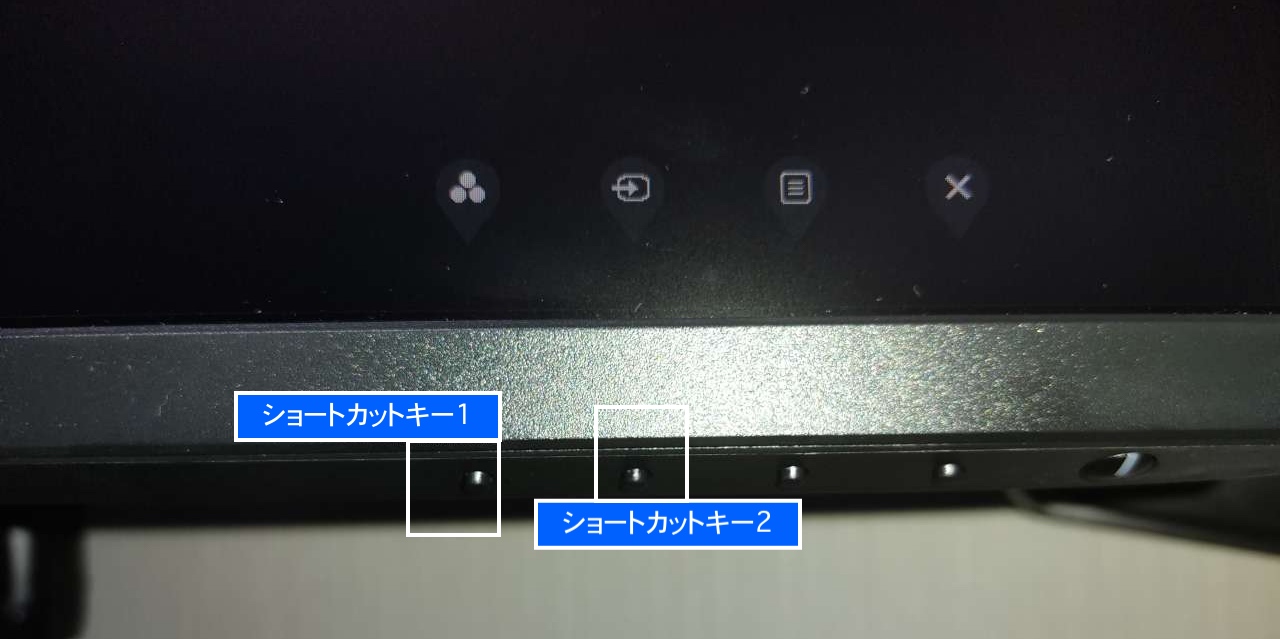
また、Dellモニター 電源ボタン メニュー設定(パーソナライズ機能)を活用していないユーザーが目立ちます。OSDメニューの「カスタマイズ」項目から、電源ボタンの横にあるショートカットキー1・2に対して「輝度/コントラスト」「プリセットモード」を直接割り当てておくことで、階層メニューを潜ることなくワンアクションで調整バーを画面上に呼び出すことが可能です。

一般に知られていない盲点とネットの誤解|Mac接続時やHDRの落とし穴

ネット上の情報では「MacではDellモニターの明るさ調整ができない」と結論付けられるケースが散見されますが、これは半分正しく、半分は技術的な認識不足です。

macOSの仕様上、外部ディスプレイを接続した際にApple純正キーボードの輝度キー(F1/F2)を押しても、HDMIやDisplayPort経由でのDDC/CIコマンドが標準では送信されません。このためMacBook単体のようにキーボードから外部モニターのバックライトを制御できない問題が発生します。しかし、Dell公式の「Dell Display and Peripheral Manager(DDPM)for macOS」を導入するか、オープンソースのユーティリティである「MonitorControl」や「Lunar」を併用すれば、Mac環境下であってもF1/F2キーによるDellモニターの輝度スムーズ調整が完全に連動します。

さらに、Dellモニター 明るさ調整 Windows11環境における盲点として挙げられるのが、「コンテンツに応じた輝度調整(CABC / Content Adaptive Brightness Control)」や省電力機能の自動介入です。暗い画面を表示した際にバックライトが勝手に暗くなり、白い画面を開くと過剰に眩しくなる現象は、Windows側の「設定 > システム > ディスプレイ」内にある「コンテンツに基づいて明るさを最適化」のチェックを外すことで解消されます。
公の場での発言・インタビュー報道記録
【検証資料 3】公の場での発言・インタビュー報道記録(出典:kagesai.net)

【プロの結論】作業効率を高める最適環境の構築とおすすめできる人の判断基準

ディスプレイの調光環境をどのように構築すべきかは、ユーザーの作業内容や機材環境によって明確に分かれます。自身のワークスタイルに応じた最適な選択基準を整理しました。

▼ ソフトウェア(DDM / DDPM)制御を徹底導入すべき人 1日6時間以上PCに向かうビジネスパーソン、プログラマー、ライター、マルチモニター環境を構築しているユーザーです。時間帯(昼間の外光と夜間の照明)に応じてショートカットキーでこまめに輝度を最適化することで、眼の焦点調節筋(毛様体筋)の疲労を抑え、集中力の持続時間を最大化できます。

▼ モニター側の物理設定固定を維持すべき人 印刷物向けデザイン、RAW現像、映像のカラーグレーディングに携わるプロクリエイターです。ソフトウェア介入によるガンマカーブの歪みを避け、遮光フードを装着した上でキャリブレーションツールを用い、輝度120cd/㎡・色温度6500Kの規定プロファイルでOSD制御を固定管理するアプローチが必須となります。

【dell モニター 明る さ 調整】に関するよくある質問(FAQ)

Q1:OSDメニューの「輝度/コントラスト」がグレーアウトして選択できません。どうすれば解除できますか?
A1:PC側でHDR(ハイダイナミックレンジ)が有効になっているか、モニターのプリセットが「Smart HDR」「sRGB」などに固定されていることが原因です。Windowsの「ディスプレイ設定」でHDRをオフにするか、モニターのOSDメニューからプリセットモードを「標準」または「カスタムカラー」に変更してください。

Q2:MacBookにDellモニターを接続した際、キーボードの輝度キーで調整できません。
A2:macOSの標準機能ではサードパーティ製モニターのハードウェア輝度制御が制限されています。Mac対応の「Dell Display and Peripheral Manager(DDPM)」またはサードパーティ製アプリ「MonitorControl」をインストールすることで、MacのF1/F2キーと連動可能になります。

Q3:モニター本体のボタンを押しても南京錠マークが出て操作を受け付けません。
A3:OSDロック機能が有効になっています。モニターのメニューボタン(または背面ジョイスティック)を「左」または「下」方向に約10秒間長押しし続けると、アンロック画面が表示されて通常の操作が可能に戻ります。

Q4:Dell Display Manager(DDM)を起動しても「対応するDellモニターが見つかりません」と表示されます。
A4:モニター側のOSDメニューで「その他」>「DDC/CI」が「有効(Enable)」になっているか確認してください。また、USBハブや一部の変換アダプターを経由していると信号が遮断される場合があるため、DisplayPort、HDMI、またはThunderbolt/USB Type-Cケーブルでの直接接続を推奨します。

まとめ:手元での一括コントロールで快適な作業空間を手に入れる

Dellモニターにおける明るさ調整のトラブルは、仕様の理解と適切なソフトウェアの活用によってすべて解決可能です。メニューのグレーアウトはHDRや色空間の厳格な制御によるものであり、ボタンの無反応は誤操作防止のOSDロックが機能している結果に過ぎません。

日々の作業においてモニター本体へ手を伸ばす手間を省き、Dell Display Managerを活用したキーボードショートカットや自動プリセット連動へと移行することで、デスク上の操作感は驚くほど快適に進化します。目への負担を最小限に抑え、常に最適な視認性を維持できる環境を整えて作業パフォーマンスを向上させましょう。 (出典: dell モニター 明る さ 調整(Yahoo!ニュース))

dell モニター 明る さ 調整
dell モニター 明る さ 調整
dell モニター 明る さ 調整